Microsoft Azure DevOps does a great job supporting modern development workflows. It brings together boards, repos, pipelines, and test plans in a single ecosystem. But when teams start asking more nuanced questions about quality – especially around test execution and defect trends – the cracks begin to show. Test management and reporting are often where teams feel the most friction.
The good news is that while Azure DevOps has clear limitations, it also provides enough building blocks to create workable, if not perfect, solutions.
The Common Pain Points
- Built-in dashboards don’t go far enough
Azure DevOps dashboards offer basic test widgets, but they are largely summary-level. You can see counts and trends, but not much context. When stakeholders ask which features are blocked by bugs, or which areas are most unstable, the default dashboards struggle to provide clear answers.
- Test execution data is hard to analyze
Detailed test execution reporting is not readily available in a flexible, consumable format. Out-of-the-box views are tied to test plans and suites, which works for execution tracking but not for broader analysis. Once teams want to slice results by feature, area path, or iteration, they often hit a dead end.
- Limited visibility by feature or area path
One of the most frequent frustrations is the lack of reporting that aligns test results and bugs with product features. Tests live in test plans, features live on boards, and execution data lives somewhere in between. Azure DevOps does not naturally connect these dots in reports.
- Manual and automated results feel disconnected
Even when both manual and automated tests are executed in Azure DevOps, getting a single, coherent view of quality can be difficult. Teams often end up relying on tribal knowledge or manual interpretation to determine release readiness.
Working Within Azure DevOps: What Actually Helps
Despite these challenges, many teams find success by leaning into Azure DevOps’ query system, dashboards, and tagging – accepting that the solution is more “assembled” than “out of the box.”
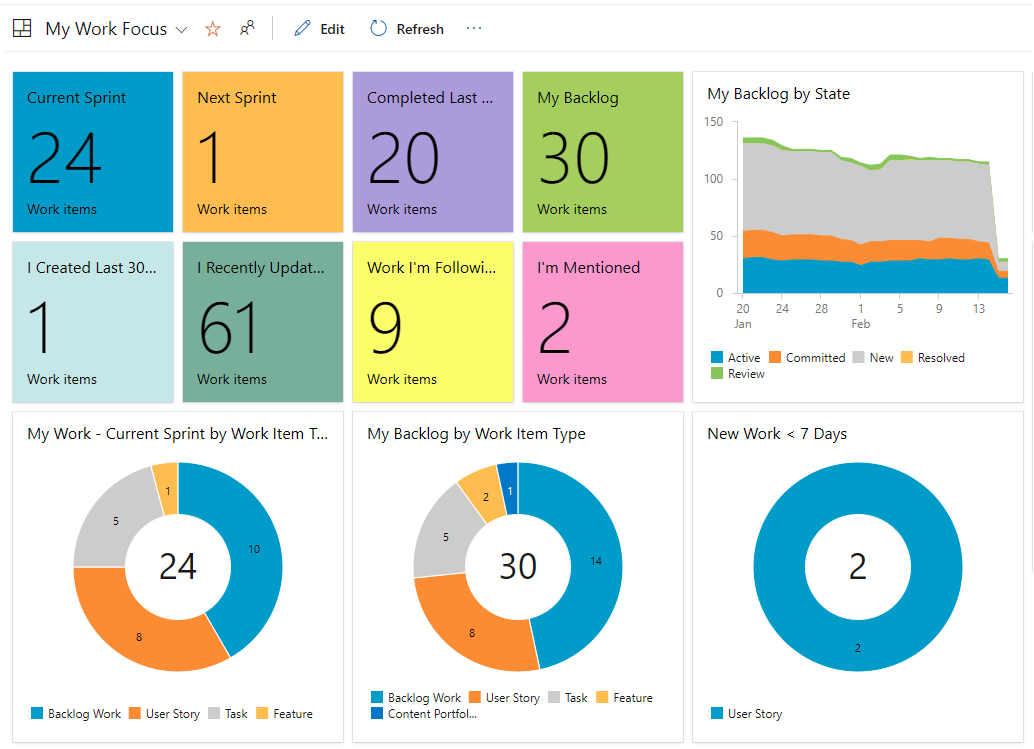
One of the most effective approaches is building custom dashboards around shared work item queries. While this doesn’t replace full test execution reporting, it can significantly improve visibility into quality at a feature level.
For example, teams can create queries that return:
- Features linked to active or resolved bugs
- Bugs filtered by state, severity, or priority
- Work items scoped to a specific iteration or area path
These queries can then be surfaced on dashboards using query-based widgets. When configured thoughtfully, they can display a clickable table showing features alongside their associated bugs and current statuses. This allows users to drill directly into problem areas without leaving the dashboard.
While this approach does not show test execution results directly, it effectively answers a question stakeholders often care about more: “Which features are currently at risk?” It also keeps the data live and interactive, rather than frozen in a static report.
Teams that get the most value from query-driven dashboards are deliberate about work item relationships. Bugs linked to features or user stories create traceability that queries can exploit. Over time, this structure enables richer views that approximate feature-level quality reporting, even without native test execution breakdowns.
Tags are another commonly used workaround. By applying consistent tags – such as feature names, test types, or quality indicators – teams can group and filter work items in ways that Azure DevOps otherwise does not support.
Tags can be used to:
- Build charts showing bug counts per feature
- Track defects related to regression, performance, or automation gaps
- Highlight work items associated with a release or testing phase
This approach is not ideal. Tags rely on human discipline, can become inconsistent over time, and lack enforcement. However, for smaller teams or those just starting to mature their reporting, tagging can provide surprisingly useful insights with minimal setup.
Dashboards become far more effective when they mix visual summaries with detailed tables. Charts built from queries can show trends or distributions, while adjacent table widgets allow users to click through and investigate specifics. Together, they turn dashboards from passive displays into active decision-making tools.
A Pragmatic Perspective
Azure DevOps was not designed to be a dedicated test analytics platform, and many of its reporting gaps stem from that reality. The key is to shift expectations slightly – from perfect test execution reports to actionable quality signals.
By using shared queries, custom widgets, structured work item links, and even tags where appropriate, teams can build dashboards that tell a meaningful quality story. These solutions may not be elegant, but they are practical, transparent, and aligned with how Azure DevOps is meant to be extended.
Ultimately, effective test reporting in Azure DevOps is less about finding a hidden feature and more about intentionally designing how work items, tests, and defects connect. When those connections are clear, reporting becomes not just possible – but genuinely useful.